|
Discover how PointMobile mobile computers and connected warehouse workflows help Malaysian businesses reduce data-entry delays, improve inventory visibility and keep warehouse records up to date.
%20(7).png) Warehouse Mobile Computer Malaysia: Capture Data in Real Time
Warehouse Mobile Computer Malaysia: Capture Data in Real Time
📦 The goods have moved. So why does the system still show the old stock quantity?
%20(3).png)
In many warehouses, physical operations happen faster than administrative updates. Employees receive goods, move inventory, pick orders and prepare shipments—but the information may only be entered into the system later.
This delay creates a gap between what is happening on the warehouse floor and what the system records.
With real-time mobile data capture, warehouse employees can record transactions as they happen using mobile computers and a suitable warehouse application. This helps businesses improve inventory visibility, reduce manual data-entry work and make operational information available sooner.
🔍 Why Is Warehouse Data Often Recorded Too Late?
%20(4).png)
Delayed warehouse data updates can happen for several reasons:
- Manual paperwork: Employees write down stock movements and enter them into the system later.
- Shared workstations: Staff must return to a computer to record completed tasks.
- Disconnected processes: Warehouse activities are not directly connected to the inventory system.
- Batch updates: Transactions are entered together at the end of a shift or working period.
- Repeated data entry: Information must be transferred from paper records into another application.
- Unclear workflows: Employees may not know when or where a transaction must be recorded.
These delays can make it harder to determine current stock levels, track inventory movements and coordinate picking or replenishment activities.
⏱️ What Happens When Warehouse Data Is Delayed?
%20(5).png)
When physical inventory and system records do not match, the consequences can extend beyond the warehouse floor.
1. Inaccurate stock visibility
The system may show inventory that has already been moved, picked or dispatched. Staff may waste time searching for unavailable stock.
2. Slower order fulfilment
Pickers may work from outdated information, creating additional checks, unnecessary movement and delays in preparing orders.
3. Replenishment mistakes
When stock movement information is recorded late, replenishment decisions may be based on incomplete or outdated inventory data.
4. More administrative work
Employees may need to reconcile paperwork, investigate discrepancies and correct transactions after the work has already been completed.
5. Delayed operational decisions
Supervisors may not have sufficiently up-to-date information to respond quickly to changing stock levels or workflow bottlenecks.
📲 How Real-Time Mobile Data Capture Works
.png)
Real-time mobile data capture allows employees to record warehouse transactions at the point where the work takes place.
A typical workflow looks like this:
- Receive a task: The employee accesses the relevant receiving, picking or stock movement task.
- Scan the item: A compatible mobile computer captures the product barcode or other supported identifier.
- Confirm the transaction: The employee enters or verifies the required quantity, location or order details.
- Submit the update: The warehouse application validates and records the transaction.
- Update the system: The relevant inventory or transaction records are updated according to the application's integration and processing rules.
The key benefit is reducing the time between the physical activity and the system update.
Real-time visibility depends on the application, network connectivity, system integration and transaction rules. A mobile computer alone does not automatically update inventory records.
📦 Where Mobile Data Capture Improves Warehouse Operations
1. Goods Receiving
Employees can scan incoming products, record quantities and capture receiving information at the receiving area. This reduces reliance on handwritten records and delayed entry.
2. Put-Away and Location Tracking
Staff can record where goods are stored by scanning the relevant product and location identifiers. This helps maintain more accurate location records when the workflow is configured correctly.
3. Inventory Movement and Stock Take
Mobile data capture can support stock transfers, cycle counts and physical inventory checks. Recording results at the point of activity helps reduce the delay between counting stock and updating the relevant records.
4. Order Picking
Employees can access picking tasks, scan products and confirm quantities while working. A configured workflow can compare scanned items against the expected order to help identify discrepancies.
5. Packing and Dispatch
Staff can record packing checks and shipment transactions before orders leave the warehouse. This helps maintain a clearer record of order fulfilment and dispatch activities.
🖥️ Why Choose a Mobile Computer Instead of Paper-Based Processes?
%20(6).png)
A mobile computer combines mobile computing with data-capture capabilities in a device designed for business operations.
Compared with a paper-based process, a connected mobile workflow can help employees:
- 📲 Record transactions at the point of activity.
- 🔎 Capture barcode data without repeatedly returning to a workstation.
- 📋 Follow structured task sequences.
- 📊 Reduce duplicate data entry.
- 🔗 Send information to a compatible warehouse or business application.
- ✅ Apply validation rules before transactions are accepted.
The actual benefits depend on how the device, application and warehouse processes are configured.
🏭 PointMobile Mobile Computers for Warehouse Data Capture
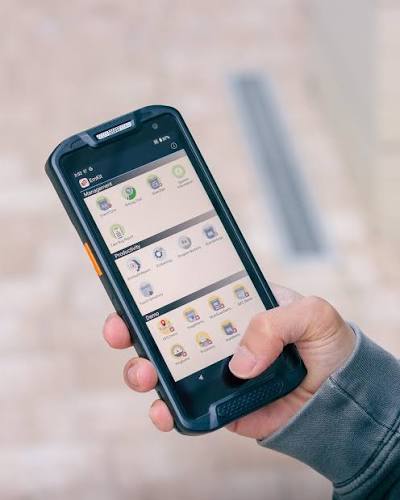
For businesses reviewing warehouse mobility solutions, PointMobile mobile computers are worth considering for barcode-based operations that require employees to capture and access information while moving around the warehouse.
When evaluating a device, consider:
- Barcode scanning requirements: Identify the barcode types and scanning distances required.
- Working environment: Consider handling frequency, operating conditions and the device's intended use.
- Mobility and ergonomics: Choose a form factor suitable for employees' daily tasks.
- Connectivity: Confirm that the device can connect to the required warehouse systems under your operating conditions.
- Application compatibility: Check whether the mobile application supports the intended device and operating environment.
- Battery and shift requirements: Evaluate whether the device can support the working pattern.
- Support and integration: Consider setup, application deployment, maintenance and ongoing technical assistance.
The right mobile computer should fit the warehouse workflow—not simply offer scanning capabilities.
🔗 Connect Mobile Computers with a Warehouse Management System
To achieve timely inventory updates, mobile computers need to work with an application that understands the business process.
A suitable Warehouse Management System (WMS) can guide employees through receiving, put-away, stock transfers, picking, packing and dispatch. It can also apply validation rules and record transactions according to the configured workflow.
Integration with an ERP or other business system may help synchronise relevant inventory and order information across departments.
For example, a warehouse employee scans a product during picking. The application checks the item against the assigned order, records the confirmed quantity and updates the relevant transaction when the required conditions are met.
This is more effective than merely capturing a barcode and leaving the information to be entered later.
🇲🇾 Real-Time Warehouse Data Capture in Malaysia
%20(7).png)
Malaysian manufacturers, distributors, retailers, logistics providers and third-party logistics (3PL) operators may handle thousands of stock movements and order transactions.
As warehouse operations grow, paper-based processes and delayed system updates can make inventory control more difficult.
A practical mobile data-capture solution should consider the entire workflow, from selecting suitable mobile computers to configuring barcode scanning, transaction validation and system integration.
ALC-TECH (M) SDN BHD provides barcode and data-capture solutions for businesses in Malaysia. Our team can discuss PointMobile mobile computers and warehouse workflow requirements to help identify a suitable approach for your operation.
🚀 Turn Warehouse Activity into Timely Data
Warehouse data is most useful when it reflects what is actually happening on the floor.
By combining suitable PointMobile mobile computers, a connected warehouse application and clearly defined transaction workflows, businesses can reduce delays between physical activities and system updates.
The goal is simple: capture the right information at the right time, so employees and managers can work with more up-to-date operational records.
Looking for warehouse mobile computer solutions in Malaysia?
Contact ALC-TECH (M) SDN BHD to discuss mobile data capture and warehouse workflow requirements for your business.
📞 WhatsApp: 03 6280 1650
✉️ Email: sales@alcaidc.com
🌐 Website: www.alcaidc.com
❓ Frequently Asked Questions:
1. What is real-time mobile data capture in a warehouse?
It is the process of recording warehouse transactions using a mobile device at the point where work happens, with information sent to the relevant system according to the application's connectivity and processing rules.
2. Why do warehouses experience delayed inventory updates?
Common causes include paper-based records, manual data entry, shared workstations, batch processing and disconnected warehouse applications.
3. What is a warehouse mobile computer used for?
A warehouse mobile computer can support barcode scanning, goods receiving, put-away, inventory checks, stock transfers, order picking, packing and dispatch.
4. Does a mobile computer automatically update inventory?
No. The device needs a compatible application and appropriate system integration. The workflow must be configured to validate and record transactions correctly.
5. What is the difference between a mobile computer and a barcode scanner?
A barcode scanner primarily captures barcode data. A mobile computer combines computing capabilities with data capture, allowing employees to run supported applications and work with operational information on the device.
6. Where can I find PointMobile mobile computers in Malaysia?
Contact ALC-TECH (M) SDN BHD to discuss PointMobile mobile computers and your warehouse data-capture requirements.
🔎 Explore More:
PointMobile Mobile Computers https://www.alcaidc.com/Public/ProductGroupBrand.aspx?ItemGroup=1005&Brand=pointmobile
Warehouse Management Solutions https://www.alcaidc.com/public/Solution/AGenWMS.aspx
ALC-TECH Company Brochure: https://www.alcaidc.com/Public/Brochure/BrochureSolution.aspx
By:
kavi
| Date:
20 Oct2026
|